WARP (Wages and Returns Professional)
WARP 2 is a user-friendly payroll and monthly returns solution designed to assist establishments with wages, payroll processing, Council-approved returns, electronic submissions, updates, backups, and EPIC imports.
Pricing
Both Party, (FBUMA) and Non-Party establishments get WARP 2 free for the first year. Thereafter, there is an annual renewal fee.
Non-Party Establishments
R1800.00
Annual renewal fee after the first free year.
Party (FBUMA) Establishments
R1200.00
Annual renewal fee after the first free year.
Note that Council does not charge VAT.
Main Features
- Capture and process weekly and monthly wages and/or produce Monthly Return forms with our user-friendly program.
- Process payroll for all your non-industry staff members.
- Produce Council approved Monthly Return forms automatically without having to capture any additional information.
- Submit Monthly Return forms electronically to the Council.
- Backup and restore your data to our online backup servers.
- Receive automatic online updates, eliminating the need to check for updates and/or circulars from the Council, including taxes and levy table changes payable to SARS.
- Submit Monthly Membership Return forms electronically to the NUFAWSA and CEPPWAWU trade unions.
- Generate EPIC Imports.
- Print professional wage slips, payslips and a wide selection of payroll reports from the program.
- Manage multiple establishments from one program.
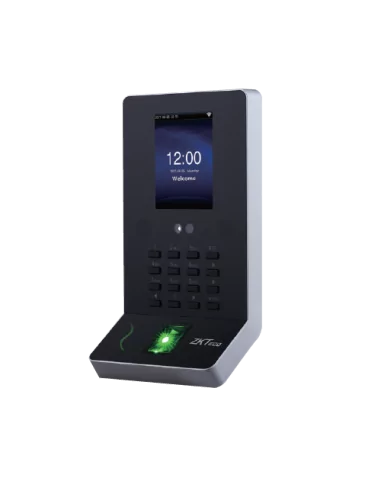
- Facial / Finger Biometric Time & Attendance machine integrated into WARP (Contact the FBC WARP helpdesk 011 242 9200 for more information and pricing)
How to Install WARP on Your PC
- Please make sure that your computer’s updates are all up to date. You can check this by searching “Check for Updates”. If there are any updates, please update them as all updates have to be done.
-
Please follow the path below to make sure .NET is ticked:
Control Panel
Programs
Programs and Features
Uninstall a Program
Turn Windows features on or offIf it does not display as enabled (ticked), please select .NET Framework 3.5 and let your computer download and install the file.
-
Check whether you have a 64-bit or 32-bit computer to make sure you use the correct link below to download WARP 2.
You can do so by searching “About Your PC”.
- When you start the WARP 2 install, it is a very long-running process. It will eventually ask you to say YES / OK.
- Download and install WARP.
- Once done, we can assist with creating login details, adding the establishment, and more.
Download Links
Please make sure you select the correct installer for your computer.
64-bit Downloadhttps://warp2win64.craffordit.co.za/WARP32/Install.html 32-bit Download
https://warp2win32.craffordit.co.za/WARP32/Install.html
If you require assistance after installation, we can help with login details, establishment setup, and getting you started.